
How to Build an SEO-Friendly Website That Ranks on Google in 2026
A website should not only look good. It should also help people find your business on Google.
Many business owners invest in a beautiful website, but after launch, they face one common problem: no traffic, no leads, and no ranking. This usually happens because SEO was not planned during the web design stage.
An SEO-friendly website is built in a way that helps Google crawl, understand, index, and rank your pages. At the same time, it gives your visitors a fast, clear, and easy experience.
In 2026, SEO-friendly web design is not optional. Whether you run a clinic, real estate business, coaching institute, ecommerce store, service company, or local business in Hyderabad, your website must be built with SEO from day one.
Planning to build a new website for your business? Slash Web Designers can help you create a fast, mobile-friendly, and SEO-ready website that is built to rank on Google and generate leads.
Table of Contents
What Is an SEO-Friendly Website?
An SEO-friendly website is a website that search engines and users can easily understand.
For Google, your website should be easy to crawl, easy to index, fast to load, mobile-friendly, and properly structured. For users, your website should be easy to read, simple to navigate, and clear enough to help them take action.
A good SEO-friendly website includes:
- Clear website structure
- Fast loading pages
- Mobile-friendly design
- Proper headings
- Clean URLs
- Useful content
- Internal linking
- Secure HTTPS setup
- Optimized images
- Technical SEO basics
- Local SEO elements
In simple words, SEO-friendly web design means building a website that is ready to rank, not a website where SEO is added later as a patch.
Why SEO Should Start During Web Design
Many business owners think SEO starts after the website is completed. This is one of the biggest mistakes.
SEO starts from the planning stage.
Your website layout, menu, page structure, URL format, content sections, loading speed, mobile design, and coding quality all affect SEO. If these things are not planned properly, your website may look professional but still fail to rank.
For example, a company may create one “Services” page and list everything on it. But from an SEO point of view, this is usually weak. If a business offers different services, each important service should ideally have its own dedicated page.
This helps Google understand each service clearly. It also helps users land on the exact page that matches their search.
For business owners, this means better visibility, better user experience, and more chances of getting leads from Google.
Key Steps to Build an SEO-Friendly Website That Ranks on Google
Building an SEO-friendly website is not about doing one thing correctly. It is a combination of good planning, clean design, technical SEO, helpful content, and regular improvement.
Each part of your website plays a role in how Google understands your business and how users experience your brand. From the way your pages are structured to how fast your website loads, every detail matters.
Below are the most important steps every business owner should understand before designing or redesigning a website.
1. Plan a Clear Website Structure
Website structure is the foundation of SEO-friendly design.
A clear structure helps Google understand which pages are important and how they are connected. It also helps visitors find the right information quickly.
A simple business website structure can look like this:
Home
About Us
Services
Individual Service Pages
Portfolio or Case Studies
Blog
Contact Us
For example, instead of keeping every service on one page, a business can create separate pages for each core service. A web design company may have separate pages for website design, ecommerce development, website redesign, website maintenance, and SEO-friendly website development.
This gives each page a clear purpose and a clear keyword target.
Why Website Structure Is Important in Web Design
Good structure improves navigation, user experience, and SEO. If users can find what they need easily, they are more likely to stay on the website and contact you.
For Google, a clear structure makes crawling easier. It also helps distribute authority from your homepage to important service pages.
2. Use Clean and SEO-Friendly URLs
URLs are small but important.
An SEO-friendly URL is short, readable, and describes the page topic clearly.
Good URL example:
/website-design-hyderabad/
Weak URL example:
/page?id=123&service=webdesign2026
A clean URL helps users understand what the page is about before clicking. It also helps Google understand the topic of the page.
URL Best Practices
Use simple words.
Use hyphens between words.
Avoid long URLs.
Avoid unnecessary dates if the content can be updated later.
Include the main keyword naturally.
For example, if you are writing a blog on website cost, a good slug can be:
/website-development-cost-hyderabad/
This is better than:
/website-development-cost-in-hyderabad-2026-complete-latest-guide/
Short and clear URLs are better for long-term SEO.
3. Create Proper Heading Structure
Headings are important for both users and search engines.
Your page should have only one H1 heading. This is usually the main title of the page. Then you can use H2 headings for main sections and H3 headings for sub-sections.
Example:
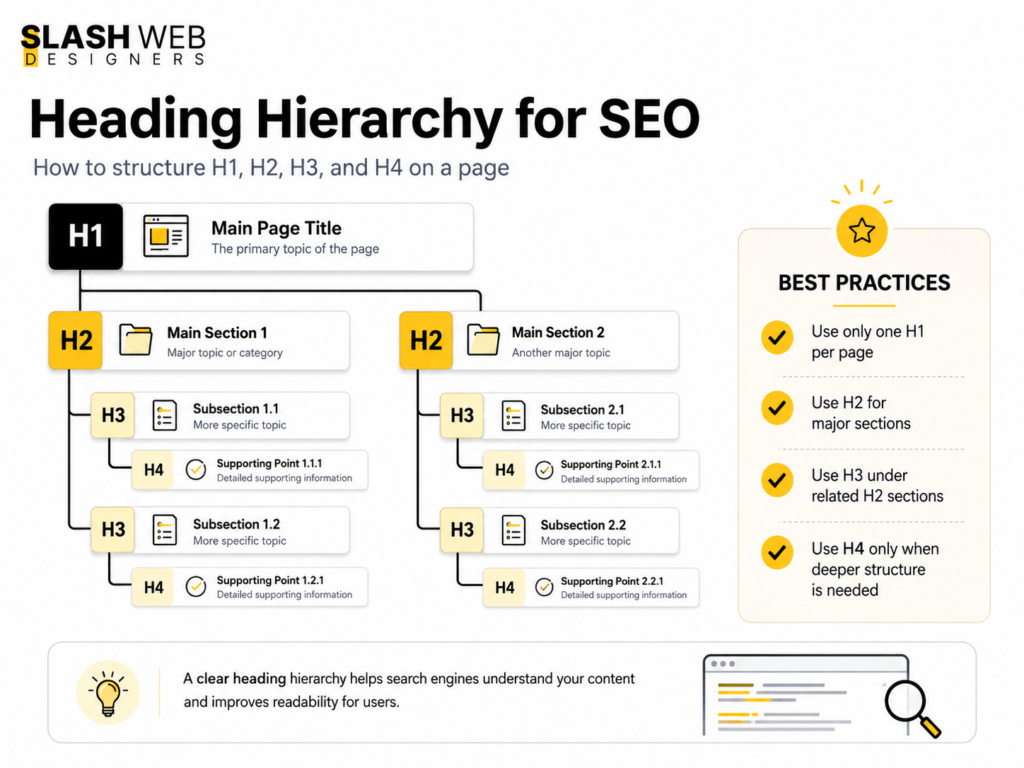
H1: Website Design Services
H2: Our Website Design Process
H3: Business Website Design
H3: Ecommerce Website Design
H3: WordPress Website Design
This structure makes the page easy to scan and easy to understand.
Why Headings Matter in Web Design
Many websites use headings only for styling. This is not good. Headings should not be used just because they look big or bold. They should follow a logical order.
Proper headings improve readability, accessibility, and SEO. Google uses headings to understand the main topics covered on a page.
For business owners, this means your important services and selling points become easier for both users and Google to understand.
4. Make the Website Mobile-Friendly
In 2026, mobile-friendly design is a basic requirement.
Most users search from mobile phones. Google also mainly evaluates the mobile version of your website for indexing and ranking. If your website looks good on desktop but is difficult to use on mobile, your SEO can suffer.
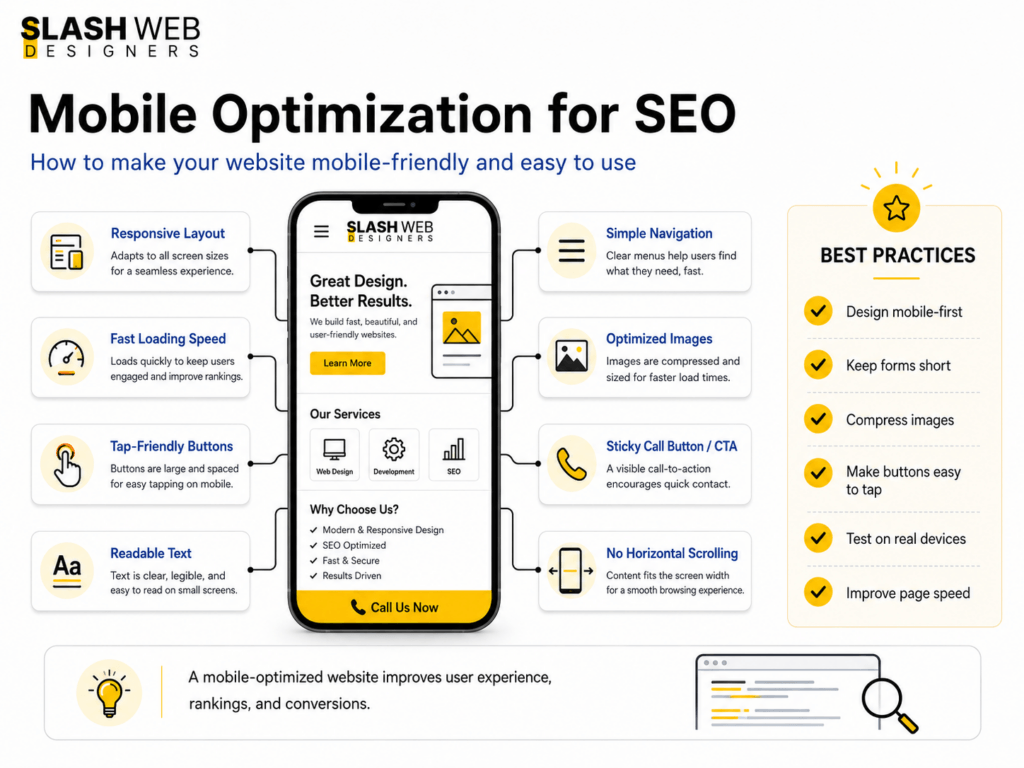
A mobile-friendly website should have:
Readable text
Easy-to-click buttons
No horizontal scrolling
Fast loading speed
Clear menu
Visible contact buttons
Simple forms
Why Mobile Design Is Important for Business Websites
Many business owners get leads from mobile users. A customer searching for a service may visit your site from a phone.
If your phone number is hard to find, your form is too long, or your website loads slowly, the customer may leave and contact your competitor.
Good mobile design improves both rankings and conversions.
A good-looking website is not enough if it loads slowly or does not work properly on mobile. Get your website reviewed for speed, SEO, and lead generation opportunities.
5. Improve Website Speed and Core Web Vitals
Website speed is one of the most important parts of SEO-friendly web design.
A slow website creates a bad experience. Visitors do not want to wait. If your website takes too long to load, people may leave before reading your content.
Google also considers page experience signals, including Core Web Vitals.
The main Core Web Vitals include:
Largest Contentful Paint, which measures loading speed.
Interaction to Next Paint, which measures responsiveness.
Cumulative Layout Shift, which measures visual stability.
In simple words, your website should load fast, respond quickly, and not jump around while loading.
How Web Design Affects Speed
Heavy images, too many animations, poor hosting, unnecessary plugins, large JavaScript files, and badly coded themes can slow down a website.
To improve speed:
Use compressed images.
Use WebP image format.
Avoid too many sliders.
Use clean code.
Choose good hosting.
Use caching.
Minimize unnecessary plugins.
Load only important scripts.
A fast website improves SEO, user experience, and lead generation.
6. Write Helpful and SEO-Optimized Content
Design brings users in visually, but content convinces them to take action.
Your website content should explain your services clearly. It should answer the questions your customers already have.
For example, a business owner looking for website design may want to know:
How much does a website cost?
How long does it take to build?
Will the website rank on Google?
Will it be mobile-friendly?
Can I update the website later?
Do I need maintenance?
Your content should answer these questions in simple English.
Keyword Research for Website Content
Before writing website content, you should know what your target audience is searching for.
For example, a web design business in Hyderabad may target keywords around website design, web development, ecommerce website development, WordPress website design, website redesign, and SEO-friendly website design.
The goal is not to repeat these keywords again and again. The goal is to understand user intent and create helpful pages around each service.
For example, instead of adding all keywords on one page, a business can create separate pages for:
Website design services
Ecommerce website development
WordPress website design
Website redesign services
Website maintenance
This makes the website easier for Google to understand and more useful for visitors.
But keywords should be used naturally. Do not stuff keywords again and again. Google is smarter now. Content should be helpful first and optimized second.
7. Optimize Title Tags and Meta Descriptions
Every important page should have a unique SEO title and meta description.
The title tag tells Google and users what the page is about. The meta description gives a short summary of the page in search results.
Example SEO title:
SEO-Friendly Website Design in Hyderabad | Slash Web Designers
Example meta description:
Build a fast, mobile-friendly, SEO-optimized website for your business with Slash Web Designers in Hyderabad. Get a website made to rank and convert.
Why Metadata Matters
A good title can improve ranking relevance. A good meta description can improve click-through rate.
Even if your page appears on Google, users will click only if your title and description look relevant and trustworthy.
For web design, metadata should be planned before launch, not added randomly later.
If you want a deeper page-level optimization guide, this on-page SEO checklist explains how titles, meta descriptions, headings, internal links, image SEO, and other on-page elements work together:
8. Use Internal Linking Properly
Internal links connect one page of your website to another.
For example, a blog on website development cost can link to a website design service page. A service page can link to related case studies, portfolio work, FAQs, or contact page.
Internal linking helps users explore your website. It also helps Google discover and understand your pages.
Good Internal Linking Examples
From blog to service page
From service page to case study
From homepage to important services
From related blog to another blog
From footer to key business pages
Avoid using only generic anchor text like “click here” or “read more.” Use descriptive anchor text when possible.
Example:
Instead of “click here,” use “learn more about our website design services.”
This tells users and search engines what the linked page is about.
9. Optimize Images for SEO and Speed
Images are important in web design, but they should be optimized.
Large image files can slow down your website. Missing alt text can reduce accessibility and image SEO.
Every important image should have:
Compressed file size
Descriptive file name
Alt text
Correct dimensions
Modern format like WebP
Example file name:
seo-friendly-website-design.webp
Example alt text:
SEO-friendly website design for business owners
Why Image Optimization Matters
Optimized images help your site load faster. They also help Google understand the visual content on your page.
For service businesses, portfolio images, team images, product photos, and project screenshots can build trust. But they should not slow down the site.
A beautiful portfolio page that loads slowly can hurt both SEO and user experience.
10. Add Schema Markup
Schema markup is structured data added to your website code. It helps Google understand your business, services, articles, reviews, FAQs, and other page details more clearly.
Common schema types for a business website include:
Organization schema
Local Business schema
Service schema
Breadcrumb schema
Article schema
FAQ schema, where relevant
Why Schema Is Important
Schema does not guarantee ranking, but it improves how search engines understand your website.
For a local business, Local Business schema can help Google understand your business name, location, phone number, services, and website details.
This is especially useful for service-based companies that depend on local search visibility.
11. Secure Your Website with HTTPS
HTTPS is a trust signal.
A website without SSL may show a “Not Secure” warning in the browser. This can reduce trust, especially if users need to fill out a contact form or make a payment.
Every business website should have a valid SSL certificate.
Why Security Matters in Web Design
Security is not only a technical issue. It affects user trust and conversions.
If a visitor feels your website is unsafe, they may not submit their details. For business owners, this means lost leads.
A secure website protects users and creates a professional impression.
12. Avoid Duplicate Content and Broken Pages
Duplicate content confuses Google.
If the same content appears on multiple URLs, Google may not know which page to rank. This can reduce your SEO performance.
Common causes of duplicate content include:
Multiple versions of the same page
HTTP and HTTPS both accessible
WWW and non-WWW versions not redirected properly
Copied service content
Poor URL parameters
Tag and category pages creating duplicate versions
Broken links and 404 pages also create a poor experience.
Why This Matters During Website Design
During web design or redesign, URLs often change. If redirects are not handled properly, old pages may break.
A professional web design process should include:
URL planning
Redirect setup
Canonical tags
404 page design
Broken link testing
This protects your SEO during launch or redesign.
13. Focus on Local SEO for Business Owners
For businesses targeting Hyderabad or nearby areas, local SEO is very important.
Your website should clearly mention your location, service areas, contact details, and business information.
Important local SEO elements include:
Google Business Profile
Consistent NAP details
Location-based keywords
Local service pages
Customer reviews
Embedded Google Map
Local schema markup
For example, a Hyderabad-based service business should naturally include its city, service areas, and local customer intent where relevant. This should be done in a natural way, not by repeating the city name in every paragraph.
Why Local SEO Matters
Many customers search with local intent, such as:
Website designer in Hyderabad
Web development company near me
Ecommerce website developer Hyderabad
Best web design company in Hyderabad
If your website is optimized for local searches, you have a better chance of attracting nearby business owners who are ready to contact you.
14. Make CTAs Clear and Visible
An SEO-friendly website should not only rank. It should also convert visitors into leads.
A CTA, or call to action, tells visitors what to do next.
Good CTAs for a web design company include:
Get a Free Website Consultation
Request an SEO-Friendly Website Quote
Talk to Our Web Design Expert
Check Website Design Packages
Start Your Website Project
CTAs should be placed naturally across the page.
Best CTA Placements
After the introduction
After explaining key benefits
Near service sections
After portfolio or case studies
At the end of the article
In the header or sticky mobile button
For business websites, CTAs should be simple and direct.
CTA Example 1:
Planning a new website for your business? Slash Web Designers can help you build a fast, mobile-friendly, and SEO-optimized website that is ready to rank on Google.
CTA Example 2:
Want to redesign your old website without losing SEO value? Get a professional website audit and redesign plan from Slash Web Designers in Hyderabad.
CTA Example 3:
Need a business website that looks professional and brings leads? Contact Slash Web Designers for SEO-friendly website design services.
15. Monitor and Improve After Launch
SEO does not stop after the website goes live.
After launch, you should monitor website performance using tools like:
Google Search Console
Google Analytics 4
PageSpeed Insights
Rank tracking tools
SEO audit tools
You should check:
Which pages are getting impressions
Which keywords are bringing traffic
Which pages are slow
Which pages have indexing issues
Which pages need content updates
Which CTAs are converting
Why Continuous Improvement Is Important
Google rankings change. Competitors improve. User behavior changes.
A website that is not updated may slowly lose performance. Regular improvements help your website stay fresh, useful, and competitive.
For business owners, this means SEO-friendly web design should be supported with ongoing SEO, content updates, and performance monitoring.
Final Thoughts
Building an SEO-friendly website in 2026 is not about adding a few keywords after the design is complete. It is about planning the website correctly from the beginning.
Your website needs a clear structure, fast loading speed, mobile-friendly design, helpful content, proper headings, clean URLs, strong internal linking, technical SEO setup, secure browsing, and regular improvement.
A good website should work like your digital sales office. It should attract visitors, build trust, explain your services, and turn visitors into leads.
For business owners in Hyderabad, investing in SEO-friendly website design can make a big difference. It helps your business appear on Google, compete with other companies, and generate long-term organic leads.
Slash Web Designers helps businesses build websites that are not only visually professional but also structured for SEO, speed, mobile experience, and lead generation.
Need an SEO-Friendly Website for Your Business?
Slash Web Designers in Hyderabad builds professional business websites with clean structure, mobile-friendly layouts, optimized pages, and clear CTAs to help convert visitors into leads.
FAQs
What is an SEO-friendly website?
An SEO-friendly website is a website designed and developed in a way that helps Google crawl, understand, index, and rank its pages. It also gives users a fast, simple, and helpful experience.
Why is SEO important in web design?
SEO is important in web design because website structure, speed, mobile layout, headings, URLs, content placement, and code quality all affect rankings. If SEO is ignored during design, the website may struggle to perform on Google.
Can a beautiful website fail to rank on Google?
Yes. A website can look beautiful but still fail to rank if it has poor structure, slow speed, weak content, missing metadata, bad mobile experience, or technical SEO issues.
How long does it take for an SEO-friendly website to rank?
It depends on competition, content quality, website authority, keyword difficulty, and ongoing SEO work. A properly built SEO-friendly website creates a strong foundation, but ranking usually improves over time with consistent optimization.
Do small businesses need SEO-friendly websites?
Yes. Small businesses need SEO-friendly websites because customers search online before contacting a company. A well-optimized website can help small businesses attract local leads and compete with bigger brands.