If you’ve started searching for a website development company in Hyderabad, you’ve probably noticed the same thing every business owner notices: there are hundreds of options, most websites look the same, and almost every agency claims to be “the best.” That makes the decision confusing, not easier.
This guide skips the sales talk. It’s a practical checklist — the same questions we’d want a business owner to ask us if we were sitting across the table from them.
Table of Contents
Why This Decision Is Harder Than It Looks
A website isn’t a one-time purchase. It’s the first impression most customers will ever have of your business, and in Hyderabad’s competitive market — whether you’re in Gachibowli, Kukatpally, Ameerpet, or anywhere else in the city — that first impression decides whether someone calls you or clicks back to Google and calls your competitor instead.
The problem is that a bad website and a good website can look almost identical in a portfolio screenshot. The real differences only show up after launch: does it load fast on a customer’s phone, does it actually bring in enquiries, and can you update it yourself without calling the agency every time. None of that is visible until you already own the site.
That’s why the selection process matters more than most business owners realize.
7 Things to Check Before You Hire a Website Development Company in Hyderabad
1. Ask to See Real Hyderabad Client Websites — Not Just a Portfolio PDF
Anyone can show you polished mockups. Ask instead for live links to websites they’ve built for other Hyderabad businesses, ideally in a category close to yours — a clinic, a manufacturer, a services business, an ecommerce store.
Open those sites on your phone. Click around. See if they actually load quickly and if the contact forms work. A portfolio slide tells you what an agency can design. A live site tells you what they can actually deliver.
2. Find Out Who Actually Owns Your Website After Launch
This is the single most overlooked question, and it causes real problems later. Ask directly: do you get the domain, hosting, and website files in your name, or does the agency keep control?
Some smaller developers build sites under their own hosting account and never hand over admin access. If you ever want to switch agencies, redesign the site, or just make a small text change without paying someone, you need full ownership from day one. Get this in writing before you pay anything.
3. Check If They Build for Mobile First, Not as an Afterthought
More than half of the people searching for a website development company in Hyderabad — or searching for your business — are doing it on a phone. If an agency talks about “desktop design” first and mentions mobile only when you ask, that’s a sign their process is outdated.
A good developer designs for the phone screen first, then scales up to desktop. Ask to see how a page they’ve built actually behaves on a mobile browser, not just how it looks in a resized desktop screenshot.
4. Ask What Happens After the Website Goes Live
Some agencies treat launch day as the finish line. Others treat it as day one. Ask what support looks like in month two, month six, and month twelve — will they help with updates, fix bugs, add new pages, or is that a separate negotiation every time?
This matters because your website will need small updates constantly: new services, updated pricing, a new team photo, a blog post. If every small change means a new invoice and a week’s wait, the website becomes a liability instead of a marketing tool.
5. Look at Their Own Website’s Speed and Google Ranking
Here’s a quick, honest test: search for the agency itself, and open their website on your phone. Does it load quickly? Does it show up reasonably well in Google for their own services? Do their case studies mention real results — traffic, enquiries, rankings — or just design awards?
An agency that can’t get its own website to load fast or rank decently is unlikely to get yours there either. This one test filters out a lot of options quickly.
6. Get Clarity on Pricing Before You See the Quote
Website pricing in Hyderabad varies enormously — from a few thousand rupees for a template site to several lakhs for a fully custom build. Before you get a quote, ask what’s actually included: number of pages, number of design revisions, whether SEO basics are set up, whether the site is built on a proper platform or a locked-down builder you can’t move away from later.
Vague pricing usually means vague scope, and vague scope is where costs quietly grow after you’ve already committed.
7. Ask How They Handle Content and SEO Basics
A beautiful website that nobody can find on Google isn’t doing its job. Ask whether basic SEO — proper page titles, meta descriptions, fast loading, mobile-friendliness, and simple technical setup — is included by default, or treated as a separate paid add-on you’ll need to figure out later.
You don’t need an agency to promise page-one rankings — no honest one will, since Google doesn’t work that way. But the foundation should be built correctly from day one, so your marketing efforts later aren’t fighting the website itself.
Red Flags That Should Make You Pause
A few warning signs worth taking seriously:
They can’t show you live websites for real clients, only images or PDFs.
They’re vague or evasive about who owns the domain and hosting after payment.
The quote has no breakdown — just one lump number with no explanation of what’s included.
They guarantee a specific Google ranking or a specific number of leads. No legitimate agency can promise this.
Their own website is slow, outdated, or doesn’t work properly on mobile.
None of these alone is disqualifying, but two or more together are worth a serious second thought.
Cheap vs Affordable: Know the Difference
Hyderabad has no shortage of very cheap website offers — some for a fraction of what a proper build costs. Cheap and affordable aren’t the same thing.
Affordable means fair pricing for real work: a mobile-friendly design, basic SEO setup, and a site you actually own. Cheap often means a locked template you can’t customize, hosting you don’t control, and hidden costs the moment you want to add a page or fix something.
The real cost of a “cheap” website usually shows up six months later, when you’re paying twice — once for the original site, and again to redo it properly.
What a Good Website Development Company in Hyderabad Actually Delivers
Strip away the sales language, and a solid website partner gives you four things: a site that loads fast and works properly on any phone, full ownership of your domain and files, a clear starting point for SEO instead of a blank slate, and a straightforward way to get updates done without friction.
If a proposal doesn’t clearly address all four, it’s worth asking more questions before signing.
How Slash Web Designers Approaches This Differently
We work with Hyderabad businesses who’ve often already had one website that didn’t perform — slow, hard to update, or simply invisible on Google. So our process starts with the questions above, not a sales pitch: what does your website need to actually do for your business, who’s searching for you, and what happens after launch.
Every site we build is mobile-first, comes with clean technical SEO from day one, and you get full ownership of your domain and hosting — no lock-in. If you want a straightforward second opinion on a quote you’ve already received, or want to talk through what a new website should include for your business, get in touch with our team — no pressure, just a clear answer.
FAQs
How much does website development cost in Hyderabad?
It varies widely based on scope — a simple business website typically starts in the tens of thousands of rupees, while a custom site with ecommerce or advanced functionality can run into several lakhs. Get a detailed breakdown of what’s included before comparing prices across agencies.
How long does it take to build a website?
A standard business website usually takes 3–6 weeks from kickoff to launch, depending on how quickly content and approvals come back from your side. Larger or custom builds can take longer.
Do I need a website if I already have a strong social media presence?
Yes. Social platforms can disappear, change algorithms, or restrict your reach overnight — your website is the one property you fully control, and it’s what shows up when someone searches for your business by name on Google.
Can I update the website myself after it’s built?
With most modern platforms, yes — you should be able to edit text, swap images, and add pages without calling a developer for every small change. Ask this specifically before signing, since some agencies build on systems that lock you out.
What’s the difference between a website developer and a website development company?
An individual freelance developer can be a good fit for very simple projects, but a company gives you a team — design, development, and ongoing support — so the project doesn’t stall if one person is unavailable. For anything beyond a basic site, a company setup is usually the safer choice.
Final Thought
Choosing a website development company in Hyderabad isn’t about finding the cheapest quote or the flashiest portfolio — it’s about finding a team that builds something you actually own, that works properly on a phone, and that gives your business a real foundation to be found on Google. Ask the questions above before you sign anything, and you’ll avoid the two most common regrets business owners have about their first website.
If you’d rather skip the guesswork, talk to Slash Web Designers about what your website should include — we’ll give you a straightforward answer, not a sales pitch.
If someone in Gachibowli searches “web designer near me” right now, Google isn’t checking your website first. It’s checking your Google Business Profile. Your profile is what shows up on Maps, in the map pack, and often right at the top of the search results, before anyone even clicks through to your site.
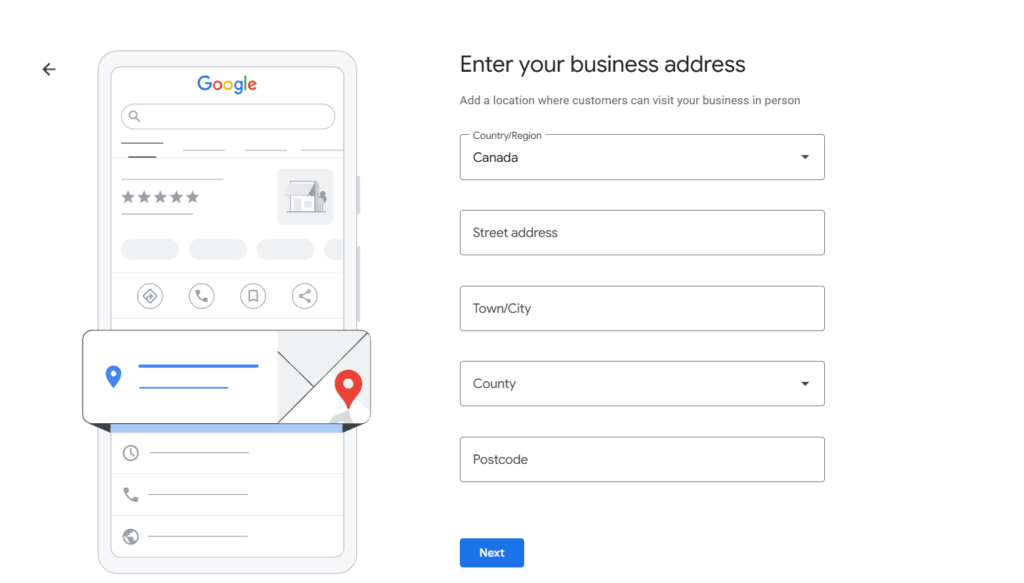
Setting one up takes twenty minutes. Setting it up properly, the kind that actually shows up when customers search, takes a bit more care. This guide walks through both: creating your profile from scratch, and optimizing it once it’s live, with real screenshots at every step.
Table of Contents
Why Your Google Business Profile Matters More Than Your Website
A good website builds trust once someone lands on it. A Google Business Profile is what gets them there in the first place, especially for local searches. It’s free, it takes minutes to update, and it’s usually the very first thing a potential customer sees about your business.
We’ve covered this in more depth in our guide on local SEO for Hyderabad businesses, where your Google Business Profile is the single biggest ranking factor for showing up in the map pack. This post is the detailed, click-by-click version of that first step, so you can actually go and do it today.
How to Set Up Your Google Business Profile: Step by Step
Step 1: Search for Your Business on Google
Start by typing “my business” or your actual business name into Google search. If your business already exists on Google (even one someone else created or Google auto-generated from an old listing), you’ll see it appear with an option to manage it. If nothing comes up, you’ll create a fresh profile.
Either way, this is your starting point. Don’t skip this step and create a duplicate listing, duplicate profiles for the same business confuse Google and can hurt both listings.
Step 2: Claim or Create Your Profile
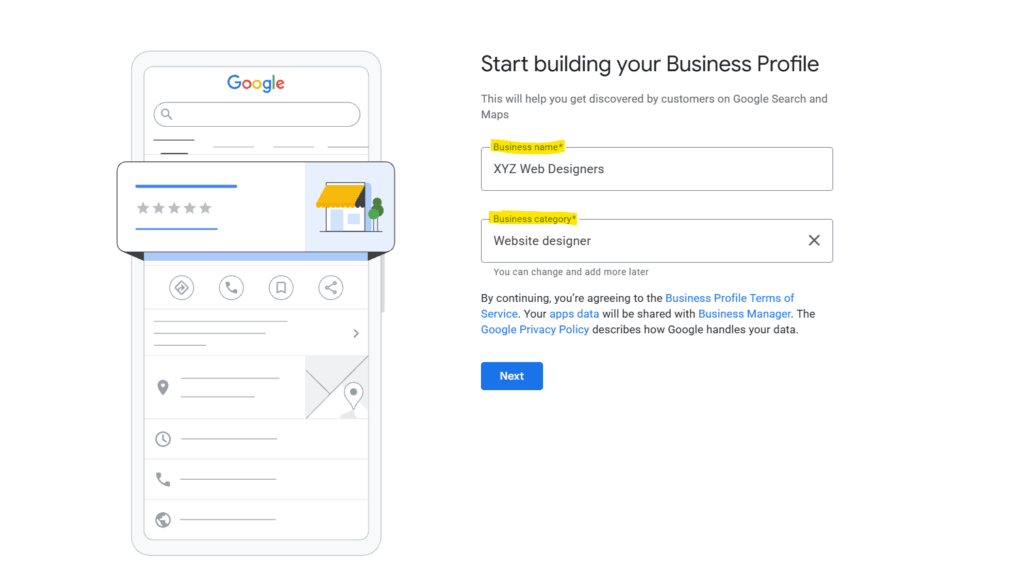
If a listing already exists, click “Claim this business” and follow the prompts. If not, go to Google Business Profile and start a new one. You’ll be asked for your business name exactly as it appears on your signage and paperwork. Don’t add extra keywords here (“Slash Web Designers – Best Website Company Hyderabad”) — Google penalizes keyword-stuffed business names, and it looks unprofessional to customers too.
Step 3: Choose the Right Business Category
This is the one step most business owners rush through, and it’s the one that matters most. Your primary category decides which searches you show up for. A web design agency should pick “Website Designer” as the primary category, not something broader like “Marketing Agency” or “Software Company.” You can add secondary categories later (like “Web Hosting Company” or “Internet Marketing Service”) if they genuinely apply.
Think about what your ideal customer types into Google, not what sounds most impressive about your business.
Step 4: Add Your Business Name, Address and Contact Details
Enter your address exactly as it appears everywhere else your business is listed, your website footer, your invoices, any directory listings. This consistency (called NAP, for Name, Address, Phone) is something Google checks when deciding how trustworthy your listing is. Getting “Gachibowli, Hyderabad” on Google and “Gachibowli, Hyderabad, Telangana 500032” on your website isn’t a huge issue, but pick one format and use it everywhere.
If you serve customers at your location, mark it as a storefront. If you only work at client sites (common for many service businesses), you can hide your exact address and set a service area instead.
Step 5: Verify Your Business
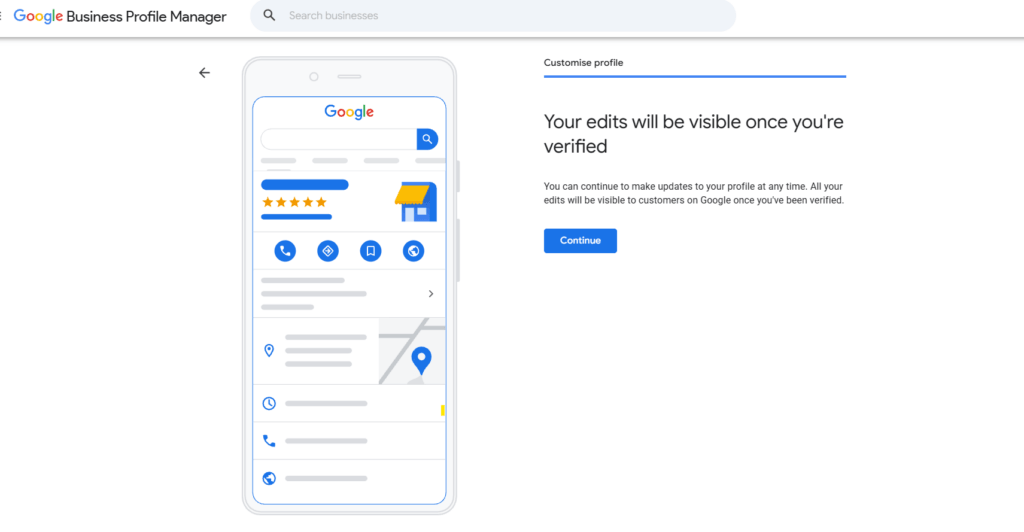
Nothing you’ve added so far is visible to customers until you verify. Google will usually offer a verification method, phone, email, or a postcard mailed to your business address. Postcard verification is common in India and can take one to two weeks to arrive, so don’t wait until you need the listing live to start this step.
Once verified, every edit you make becomes visible on Search and Maps immediately.
How to Optimize Your Google Business Profile Once It’s Live
Setting up the profile gets you on the map, literally. Optimizing it is what actually gets you calls and clicks. Here’s what to fill in and why each piece matters.
Write a Clear Business Description
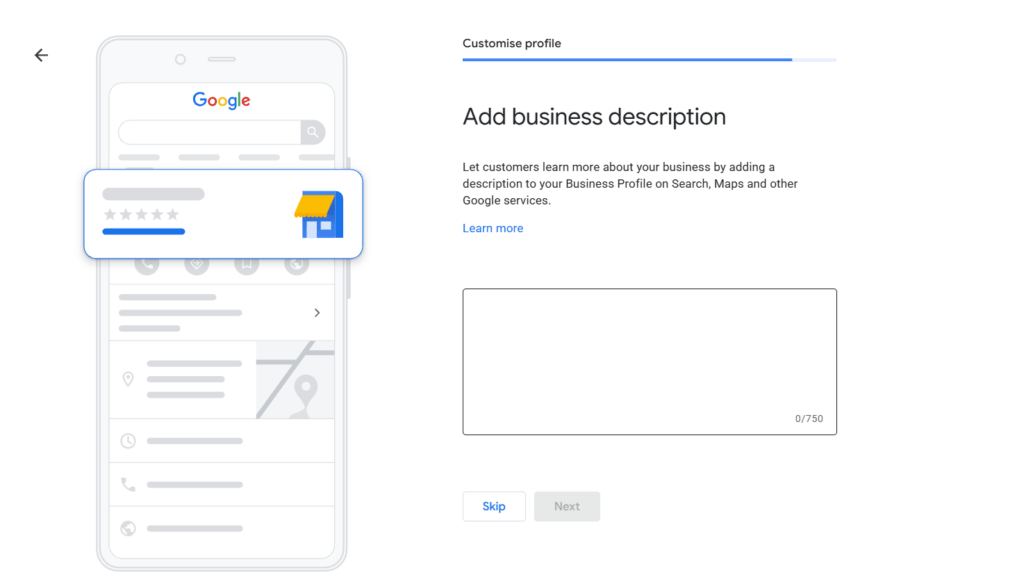
You get 750 characters to describe what you do. Use them well. Skip the generic “we provide top quality services” language and write specifically: what you do, who you do it for, and where. For a web design business, something like “We design and build websites for small businesses and startups across Hyderabad, from single-page sites to full e-commerce stores” tells both Google and the customer exactly what to expect.
Mention your service area naturally in this description. It’s one more signal that reinforces you’re a real, local business, not a directory listing or a franchise page.
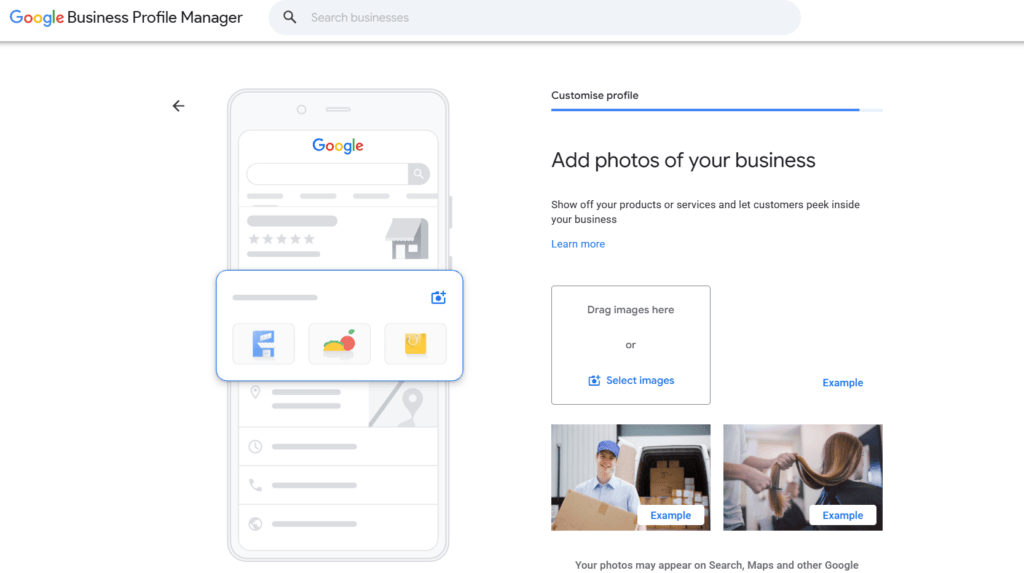
Add Real Photos, Starting With Your Shop Front
Profiles with real, recent photos get more clicks than ones without, and stock photos don’t help the way people assume they do. Start with a shop front photo, this is what helps customers recognize your location and match it to what they see when they arrive.
Then add photos of the inside of your office, your team at work, and anything that shows the business is active and real. Add new photos every few weeks if you can. A profile that hasn’t added a photo in a year reads as inactive, even if the business is very much alive.
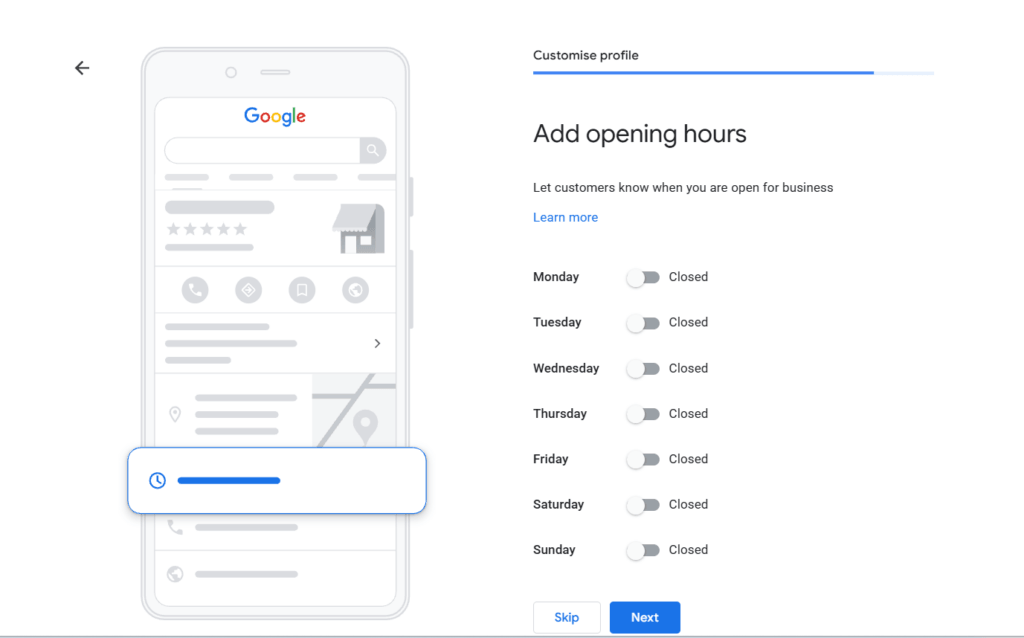
Set Accurate Opening Hours
This sounds obvious, but wrong hours are one of the most common reasons customers get frustrated with a business before they’ve even called. Set your regular hours, and remember to update special hours around holidays.
If your hours change seasonally or you’re closed on public holidays, update this in advance rather than after someone’s shown up to a locked door.
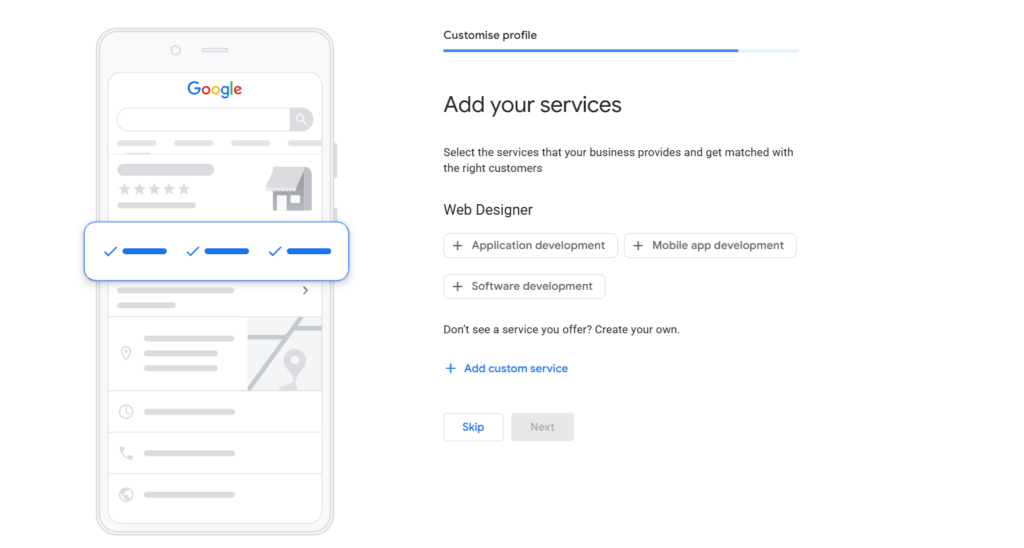
List Your Services in Detail
Google lets you add a structured list of services, not just a general category. For a web design business, that might mean listing website development, responsive design, e-commerce websites, and web application development separately, rather than lumping everything under “web design.”
This does two things: it helps Google match your listing to more specific searches, and it helps a customer scanning your profile understand your full range without needing to click through to your website first.
Add Contact Details and Turn On Messaging
Add your phone number and your website link so customers have a direct path to you. If you have a well-built, SEO-friendly website behind your listing, this is where that work pays off, since customers who click through are already primed to trust you. If your website itself needs work, that’s worth fixing alongside your profile; we’ve written a full guide on what makes a website SEO-friendly if you want to check yours against it.
Turning on chat lets customers message you directly from the listing without calling, which matters more than most business owners expect, a lot of people, especially younger customers, would rather send a quick message than make a call.
Post Updates Regularly
Most business owners never touch the “Posts” feature, which is exactly why using it gives you an edge. A short post about a recent project, an offer, or even a small update signals to Google that your listing is active and maintained. It doesn’t need to be elaborate, one or two lines with a photo is enough, done every couple of weeks.
Collect and Respond to Reviews
Reviews are the second biggest local ranking factor after the profile itself, and they’re the fastest way to earn a stranger’s trust. Ask happy customers directly, right after a good project or interaction, rather than sending a generic request months later. And respond to every review you get, good or bad. An unanswered negative review sitting there for months looks worse to a future customer than the review itself.
Never buy reviews or ask for fake ones. Google actively detects this, and it can get a listing suspended entirely, which is a much bigger problem than a few average reviews.
If your website isn’t set up to convert the traffic your Google Business Profile sends it, that’s worth a separate conversation. Talk to us about your website and we’ll tell you honestly what’s working and what isn’t.
Common Google Business Profile Mistakes to Avoid
Keyword-stuffing the business name. Google can suspend listings for this, and it looks unprofessional regardless.
Picking the wrong primary category because it sounds more impressive, instead of the one customers actually search.
Leaving the profile untouched after setup. An unverified, half-filled, or outdated profile does less for you than no profile changes at all.
Inconsistent NAP details across your website, directories, and your profile. We go into this in more detail in our guide on common website design mistakes Hyderabad businesses make, since a lot of these issues start on the website side.
Ignoring messages and reviews. A profile that doesn’t respond looks abandoned, even if the business behind it is busy and thriving.
FAQs
1. Is Google Business Profile the same as Google My Business?
Yes. Google renamed Google My Business to Google Business Profile in 2021. The setup process and features are largely the same, just under a new name, and a lot of people still search using the old name out of habit.
2. How long does it take to verify a Google Business Profile in India?
Phone or email verification can be instant. Postcard verification, still common for many Indian businesses, usually takes one to two weeks to arrive by post. Start this early rather than waiting until you need the listing live.
3. Do I need a website to have a Google Business Profile?
No, you can create and verify a profile without a website. But a profile without a website behind it caps how much trust and information you can offer a customer who’s genuinely interested, and it means you’re relying entirely on Google’s platform rather than owning your own presence.
4. How often should I update my Google Business Profile?
At minimum, check it monthly for accurate hours and respond to any new reviews or messages. Adding a photo or a short post every couple of weeks keeps the listing looking active, which Google’s local algorithm rewards.
5. Can I manage a Google Business Profile myself, or do I need help?
You can absolutely set one up and maintain the basics yourself, none of this requires technical skill, just consistency. Where business owners usually get stuck is connecting it to a website that’s actually built to convert that traffic into calls and leads.
Conclusion
A Google Business Profile is one of the few pieces of local SEO that costs nothing and takes almost no technical skill, yet most Hyderabad businesses either haven’t set it up properly or set it up once and never touched it again. Claim it, fill in every section honestly and specifically, add real photos, and keep it active with posts and review responses.
If your website isn’t doing its share of the work once customers click through from your profile, get in touch with us. We’ll take an honest look at what’s holding it back.
If your business depends on people finding you nearby — a clinic, a salon, a gym, a real estate office, any kind of local service — your ranking on Google Maps matters more than almost anything else you do online. Most Hyderabad business owners have a decent website and still don’t show up when a customer nearby searches for exactly what they offer. This guide breaks down why that happens and exactly what to do about it, based on real client work and current search data, with a clear step-by-step process you can start today.
Table of Contents
Why “Just Having a Website” Isn’t Enough Anymore
Walk through Gachibowli, Madhapur, or Kukatpally and you’ll find dozens of good businesses with a decent website that still doesn’t bring in a single call from Google. The owner did everything “right”, hired a designer, got a nice homepage, added a contact form. But when a customer nearby searches “salon near me” or “best interior designer in Kondapur,” that business is nowhere on the map.
That’s not a website problem. That’s a local SEO problem.
At Slash Web Designers, we’ve built and optimised websites for over 150 businesses across Hyderabad, real estate firms, clinics, resorts, IT companies, NGOs. The pattern is consistent: the businesses that show up on Google Maps get the calls. The ones that don’t, don’t. This guide walks through exactly what local SEO means and how to do it, step by step, without hiring an agency if you don’t want to.
What Local SEO Actually Means
Local SEO is the work you do to make Google show your business when someone nearby searches for what you offer. It’s different from regular SEO because Google isn’t just matching keywords, it’s using your location, your Google Business Profile, and how people interact with your listing to decide who shows up in the “map pack” (the three business listings that appear under the map at the top of local search results).
Local search isn’t a small slice of traffic anymore. According to BrightLocal’s research on Google’s local algorithm, roughly 46% of all Google searches now carry local intent, meaning people are searching with a nearby business in mind, whether or not they type “near me.” And when someone does search “near me” on their phone, the intent to act is high: most of these searches lead to a store visit or a phone call within a day.
If your business depends on local customers walking in, calling, or booking like a clinic, a salon, a gym, a café, a real estate office, a service provider, this is where your SEO effort should start.
How to Improve Your Local SEO: Step by Step
Local SEO isn’t one setting you switch on, it’s five connected pieces that reinforce each other: your Google listing, your website, your citations, your reviews, and your content. Get these right in order, and the map pack ranking follows. Here’s how to work through each one.
Step 1: Get Your Google Business Profile Right
Your Google Business Profile (GBP): the free listing that shows your business on Maps and in the map pack, is the single biggest local ranking factor. Per the Whitespark 2026 Local Search Ranking Factors survey, GBP signals alone account for roughly a third of what decides your local ranking, ahead of reviews, on-page SEO, and links combined.
Here’s what actually moves the needle:
Claim and verify your Google Business Profile: If you haven’t claimed your listing on Google Business Profile, do that first. Nothing else here works until it’s verified.
Pick the right primary category: This is the single factor SEO experts weigh the most. “Web Designer” and “Website Design Company” rank differently — pick the one your ideal customer would actually search.
Fill in every section: Business hours, service area, phone number, website link, products/services list, photos. An incomplete profile signals low trust to Google, and to the customer scrolling past it.
Add fresh photos regularly: Profiles with recent, real photos (not stock images) get more clicks and more calls. Photos of your actual office in Gachibowli or Banjara Hills do more than any stock photo of a generic “team meeting.”
Post updates: GBP has a “Posts” feature most businesses ignore. Offers, updates, and short posts signal an active, trustworthy business — one of the behavioural signals Google’s local algorithm rewards.
Step 2: Fix Your Website’s Local On-Page SEO
Your Google listing gets people to notice you. Your website is what convinces them and what Google uses to confirm you’re a legitimate local business. A few things matter more than people expect:
NAP consistency. Your Name, Address, and Phone number should be written identically everywhere — your website footer, your GBP listing, every directory. “Slash Web Designers, Gachibowli, Hyderabad” and “Slash Web Designers Pvt Ltd, Gachibowli” are, to Google, two different signals of the same business. Inconsistency quietly hurts you.
A real, dedicated contact/location page: Not just a phone number in the footer — an actual page with your address, an embedded Google Map, hours, and directions.
Location-specific content, not generic copy: If you serve multiple areas of Hyderabad, don’t just list them in a footer. A short paragraph about the neighbourhoods you serve, written naturally, tells Google (and the reader) you’re genuinely local. We cover the technical side of this in more depth in our guide on how to build an SEO-friendly website that ranks on Google.
Mobile speed: Most local searches happen on a phone, standing outside your competitor’s shop, deciding where to go next. A slow site loses that customer before it loads. If your site takes longer than 3 seconds to load, this is worth fixing before anything else on this list.
Step 3: Get Listed on the Directories That Matter in India
Beyond Google, Indian local search still runs partly through directories, and these listings act as “citations” that reinforce your NAP data across the web. Prioritise:
JustDial — still heavily used for local service search in India
Sulekha — strong for service-based businesses
IndiaMART — useful if you sell products or B2B services
Industry-specific directories :a clinic should be on Practo, a restaurant on Zomato/Swiggy, a real estate business on 99acres or MagicBricks
Each one should carry the exact same business name, address, and phone number as your GBP listing. This consistency is one of the citation signals that local ranking studies consistently point to as a trust factor.
Step 4: Build a Steady Stream of Google Reviews
Reviews are the second-biggest ranking factor after your GBP profile itself, and they’re also the fastest way to build trust with a customer who’s never heard of you. A business with 40 reviews at 4.7 stars will almost always beat a business with 3 reviews at 5 stars, volume and recency matter, not just the average.
What actually works:
Ask happy customers directly, right after a good interaction, a WhatsApp message with your review link works better than a generic email blast
Respond to every review, good or bad , an unanswered bad review looks worse than the review itself
Never buy or fake reviews, Google actively detects and penalises this, and it can get your listing suspended
Step 5: Write Content for Your Actual Neighbourhood
This is the step most businesses skip, and it’s where a blog like this one earns its keep. Generic “top 10 tips” content doesn’t help your local ranking much. Content that mentions real Hyderabad context, specific localities, local pain points, local examples, signals relevance for local search in a way generic content can’t.
If you’re a business with multiple service areas, a short guide, case study, or FAQ page built around a specific locality or a specific local problem does more for local SEO than another generic service page. We’ve seen this work directly in client projects — our case study on NGO website design for Letusserve Foundation in Hyderabad is a good example of local, specific content outperforming generic pages.
Common Local SEO Mistakes Hyderabad Businesses Make
Inconsistent NAP across listings. The most common and most damaging mistake — different phone numbers or address formats across GBP, the website, and directories.
Ignoring the website while chasing GBP. Your Google listing can only take you so far. If the website behind it is slow, outdated, or has no real local content, conversions still fail. We’ve written more on the broader design mistakes we see across Hyderabad business websites in our guide on top website design mistakes to avoid.
Treating this as a one-time task. Local SEO isn’t “set up once and forget.” Reviews, posts, photos, and citations need ongoing attention — Google’s algorithm rewards businesses that stay active.
No mobile optimisation. Given that most “near me” searches happen on a phone, a site that isn’t fast and easy to use on mobile is losing the exact customers local SEO is meant to bring in.
How Long Does Local SEO Take to Show Results?
Realistically, 3 to 6 months for meaningful movement, and longer in competitive categories like web design, real estate, or clinics in high-density areas like Madhapur or Kondapur. Google Business Profile changes can show impact faster — sometimes within weeks — but on-page and citation work compounds over months, not days. Anyone promising Google Maps rankings in a week is not being straight with you.
Ready to Turn Local Searches Into Customers?
A website that isn’t built with local SEO in mind will always be fighting an uphill battle on Google Maps, no matter how many directories you list yourself on. If you want a website that’s structured for local search from day one — fast, mobile-first, and built around how your customers actually search — talk to us about your website. We’ll take a look at what’s holding your current site back and tell you honestly what’s worth fixing first.
FAQs
1. How is local SEO different from regular SEO?
Regular SEO focuses on ranking for keywords anywhere in the world. Local SEO focuses on ranking for people searching near your specific location — it relies heavily on your Google Business Profile, local reviews, and location-specific content, not just keywords.
2. Do I need a website if I already have a Google Business Profile?
Yes. Your GBP listing gets you noticed, but Google still checks your website to confirm you’re a real, trustworthy business — and it’s your website that actually converts the click into a customer. A profile without a solid website behind it caps how far you can rank.
3. How much does local SEO cost for a small business in Hyderabad?
It depends on how much you do yourself versus outsource. GBP setup and directory listings can be done for free with time investment. Ongoing local SEO support (content, technical fixes, review management) from an agency typically starts in the range of a few thousand rupees a month, depending on scope — worth discussing directly based on your business and competition.
4. Can I do local SEO myself, or do I need an agency?
You can absolutely start it yourself — GBP optimisation and directory listings don’t require technical skill, just consistency. Where most business owners get stuck is the website’s technical and content side, which is where a lot of the ranking impact actually happens.
5. Why isn’t my business showing up on Google Maps even though I’m listed?
Usually one of three things: an incomplete or unverified GBP profile, inconsistent NAP details across the web, or a lack of reviews compared to competitors in the same category and area. Rarely is it just “bad luck” — it’s almost always fixable.
Conclusion
Local SEO isn’t a mysterious algorithm trick, it’s a handful of consistent habits: a complete Google Business Profile, a website built to support it, consistent business details everywhere you’re listed, and a steady stream of real reviews. Most Hyderabad businesses that struggle to show up on Google Maps are missing two or three of these, not all of them. Start with your Google Business Profile this week, then work through the rest of this list. And if your website itself is the weak link, talk to us — we’ll tell you straight what’s worth fixing first.
You decided your business needs a proper website. Good. But now you’re staring at a dozen questions with no clear answers. Do you buy the domain first or the hosting? Who writes the content? Do you need a logo before you start? And the scary one nobody warns you about: what stops you from spending forty thousand rupees and ending up with a pretty website that just sits there and brings you zero customers?
That last part is the real problem. Most business owners in Hyderabad don’t end up with an ugly website. They end up with a lifeless one. It looks fine, it loads, it has an About page, and it does nothing for the business. It becomes a digital visiting card, not a salesperson.
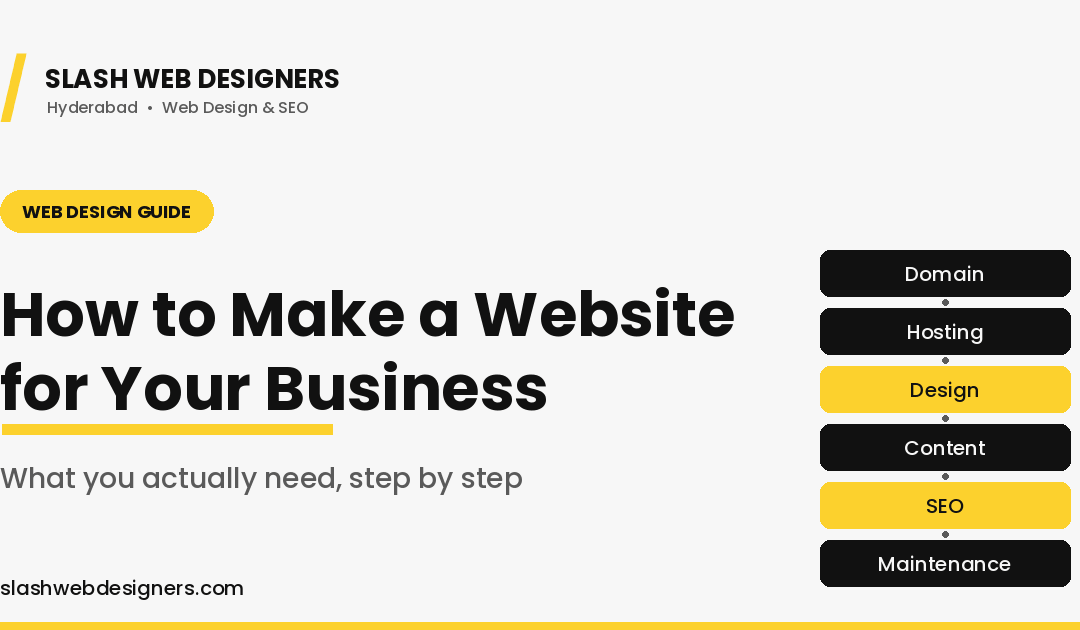
This guide walks you through how to make a website for business the right way, in plain order, without the jargon. By the end you’ll know exactly what to arrange, what to hand your designer, and what separates a website that just exists from one that actually brings you leads.
Table of Contents
What “Making a Business Website” Really Means
Before you spend a rupee, get one idea straight. A website is not a single thing you buy once. It’s a few separate pieces that fit together, and each piece has a job.
Think of it like opening a physical shop. You need the location, the shop itself, the signboard, the products on display, and someone to keep the place clean and open every day. A website works the same way. Skip a piece and the whole thing feels half-done.
Once you see a website as a set of connected parts instead of one purchase, the whole website design process stops feeling confusing. You just handle the pieces one by one. Let’s go in the order that actually makes sense.
Step 1: Lock Down the Foundation (Domain, Hosting, Security)
This is the ground your website stands on. Get it right early and everything after it goes smoother.
Your Domain Name
Your domain is your web address, like yourbusiness.com. It’s the first thing people read and the easiest thing to get slightly wrong.
Pick something short, easy to say out loud, and easy to spell. If a customer hears your business name on a phone call and can’t type it correctly on the first try, the domain is too clever. Skip hyphens and odd spellings. A .comstill carries the most trust for a business, and .in works well if you serve mainly Indian customers.
Buy the domain in your own name and keep the login details with you, not only with your designer. This one small habit saves a lot of stress later if you ever change who works on your site.
Reliable Web Hosting
Hosting is the space where your website actually lives. When someone types your address, hosting is what delivers the site to their screen.
Cheap hosting is tempting and it quietly costs you customers. A slow or shaky host means your site loads late or goes down at the worst moments, and visitors leave before they ever see what you offer. You don’t need the most expensive plan. You need one that is fast and stable, ideally with servers that serve Indian visitors quickly.
A good web partner will recommend hosting that fits your traffic and budget instead of pushing the most expensive option. If you’re already thinking about what a proper build involves, our page on professional website development in Hyderabad breaks down how the foundation is set up correctly from day one.
SSL and Basic Security
SSL is the small padlock you see next to a web address. It tells visitors and Google that your site is safe.
Today this is not optional. Browsers openly warn people when a site has no SSL, and a customer who sees “Not Secure” on your homepage will not fill in your contact form. Most good hosting includes SSL, so make sure it’s switched on before you go live.
Step 2: Prepare the Pieces Only You Can Provide
Here’s the part many owners don’t expect. Your designer builds the website, but some things only you can supply. The sooner you prepare them, the faster and cheaper your project runs.
A Proper Logo
Your logo is the face of your brand. It shows up on your site, your bills, your WhatsApp, and your signboard, so it needs to look the same and look sharp everywhere.
A rushed logo made in five minutes usually shows. It looks blurry on some screens, the colours shift, and it never quite feels professional. If you already have a clean logo file, keep the original high-quality version ready. If you don’t, get this sorted before the build, because your whole website design flows from your brand colours and logo.
Real Photos of Your Business
Stock photos are fine in small doses. A website built entirely on stock photos feels fake, and customers can tell.
Real photos of your shop, your team, your work, and your actual products build instant trust. A Hyderabad customer choosing between two similar businesses will lean toward the one that looks real over the one that looks like a template. You don’t need a huge shoot. Even a set of clean, well-lit photos taken on a good phone can lift the whole site.
Your Content and Service Details
This is the words on your website, and it’s where a lot of sites fall flat. Vague lines like “we provide quality service” tell a customer nothing.
Write down, in simple points, what you offer, who you help, what makes you different, and what a customer should do next. You don’t have to be a writer. You just need to give clear, honest details, and a good designer or content person can shape them into copy that sells. Clear content is what turns a nice-looking page into one that actually convinces someone to call you.
Step 3: The Build Itself (Where Most Sites Go Wrong)
Now the pieces come together into an actual website. This stage decides whether your site quietly works for you or quietly disappoints you.
The Pages Every Business Site Needs
At a minimum, most business websites need a home page, a services or products page, an about page, and a contact page. Larger businesses add separate pages for each main service so each one can rank on Google on its own.
Keep the structure simple and logical. A visitor should always know where they are and be one or two clicks away from contacting you.
Mobile-First Design
Most of your Hyderabad visitors will open your site on a phone, not a laptop. So the site has to look and work perfectly on a small screen first.
If your text is tiny, your buttons are hard to tap, or your layout breaks on mobile, you lose people instantly. A proper build treats the mobile version as the main version, not an afterthought.
Speed
A slow website loses visitors before they read a single word. People expect a page to open in a couple of seconds, and every extra second of loading pushes them toward the back button.
Speed comes from good hosting, clean design, and properly sized images. It’s not a luxury feature. It directly affects how many visitors stay and how well you rank on Google.
Lead Capture
This is the piece that turns visitors into enquiries, and it’s the one most static sites forget. If someone likes what they see, how do they reach you in one tap?
Every business site should make contact effortless: a clear contact form, a visible WhatsApp button, and a click-to-call number for mobile users. These small elements are the difference between a site that gets viewed and a site that gets you customers.
Step 4: Connect It to How People Find You Locally
A website nobody can find is a shop in a basement with no signboard. Two things help local customers actually reach you.
Google Business Profile
Your Google Business Profile is the box that appears when someone searches your business name or looks for services “near me” in Hyderabad. It shows your location, hours, photos, and reviews right on Google.
Link it with your website and keep it updated. For many local businesses, this profile brings in as many calls as the website itself, sometimes more.
Basic On-Page SEO From Day One
SEO is what helps your site show up when people search for what you offer. The best time to set it up is while the site is being built, not months later.
That means proper page titles, clear headings, fast loading, mobile-friendliness, and content written around what your customers actually search for. If you want to understand this part in depth, our guide on how to build an SEO-friendly website covers exactly what to get right from the start.
Step 5: The Part Everyone Skips (Keeping It Alive)
Here’s what nobody tells you when you’re excited about launching. A website is not a “build it and forget it” job. The sites that keep bringing leads are the ones that keep getting attention.
Website Maintenance
Website maintenance means the regular care that keeps your site healthy: software updates, backups, security checks, and fixing small things before they become big problems.
Skip it and you invite the classic disasters, a site that suddenly breaks, gets hacked, or shows an error to a customer at the wrong moment. Maintenance is cheap insurance for something your business now depends on.
Ongoing Content and SEO
A website that never changes slowly goes quiet on Google. Search engines favour sites that stay active and useful.
Adding new pages, updating your services, and publishing helpful content over time keeps your site climbing instead of fading. This is exactly why a blog like this one exists, to keep the site alive and useful.
Analytics
Analytics simply means tracking what happens on your site: how many people visit, which pages they read, and where your enquiries come from.
Without it you’re guessing. With it you can see what’s working and do more of that. It turns your website from a hopeful expense into a tool you can actually measure and improve.
Static Website vs a Website That Markets For You
This is the whole point of the guide, so read this part slowly.
A static website is the “digital visiting card.” It has your name, a few services, an About page, and a phone number. It looks fine. It also does nothing on its own. Nobody finds it, nothing updates, and no visitor is guided toward contacting you. It just exists.
A website that markets for you is built differently from the same pieces. It loads fast, it’s easy to find on Google, it speaks to your customer’s actual problem, and it constantly nudges visitors to call, message, or fill a form. It’s connected to your Google profile, it grows with fresh content, and you can see exactly what it’s bringing in.
Same domain, same hosting, same number of pages. Completely different result. The difference is not budget. It’s whether the site was planned as a marketing tool or thrown together as a formality.
Thinking through your own website? If you’re not sure whether your current site is a static visiting card or a real lead tool, that’s exactly the kind of thing we help Hyderabad business owners figure out. Talk to us about your website and we’ll tell you honestly what it needs.
“Can’t I Just Build It Free Myself?”
Fair question, and worth an honest answer. Free and DIY website builders exist, and for some situations they genuinely make sense.
If you’re testing a tiny idea, have zero budget, and just need something basic online this week, a free builder can get you started. No shame in that.
Where it quietly costs you is everything we covered above. Free builders usually mean slower sites, weaker SEO, limited lead capture, and a design that looks like a hundred other templates. You save money upfront and often lose it in leads you never received. Your time is not free either, and the hours you spend fighting a builder are hours away from running your business.
We wrote a full breakdown comparing DIY and AI website builders against hiring a professional, and it’s worth a read before you decide. The short version: free is cheapest today, and rarely cheapest over a year once you count the customers a weak site fails to convert.
What Should a Business Website Cost in Hyderabad?
There’s no single price, because a website is not one product. A simple, clean business site costs far less than a large site with many service pages, an online store, or custom features.
What moves the price is scope: how many pages you need, whether you’re selling online, how much custom design you want, and whether you need content written for you. A small local business site sits at the affordable end. An ecommerce website with payments and product pages sits higher because there’s simply more to build.
The honest advice: don’t shop for the cheapest quote, shop for the clearest one. A good quote tells you exactly what’s included, what’s not, and what maintenance costs after launch. If a price feels too good to be true, it usually skips the pieces that make a website actually work.
How to Choose the Right Web Designer (Not Just the Cheapest)
The person or team you pick matters more than any single feature. Here’s what to look for before you pay anyone.
Ask to see their past work, especially for businesses like yours. Check if their sites load fast and look good on a phone, since that’s where your customers are. Ask who owns the domain and hosting after the project (the answer should be you). Ask what happens after launch, because a designer who disappears the day the site goes live leaves you stranded.
Finally, notice how they talk to you now. If they explain things clearly and honestly before you’ve paid, that’s usually how they’ll treat you after.
FAQs
How long does it take to make a website for a business?
A simple, well-planned business website usually takes around two to four weeks. The timeline depends less on the design and more on how quickly you provide your content, logo, and photos. Owners who prepare those pieces early get their sites live much faster.
Should I buy the domain or the hosting first?
Buy the domain first, since it’s your address and you want to secure the exact name before someone else does. Hosting can be sorted right after, and often your web designer will guide you to a host that fits your site. Just make sure both are registered in your own name.
Do I need a logo before I start building the website?
It’s best to have your logo ready before the build, because your site’s colours and overall look are shaped around it. If you don’t have a proper logo yet, sort that out first. Building the site around a temporary logo often means redoing design work later.
Can I add more features to my website later?
Yes, if it’s built properly. A well-structured website can grow with your business, so you can add pages, services, a blog, or even an online store later. This is one more reason a proper build beats a rushed one, since a weak foundation makes future changes harder and costlier.
Do I really need to maintain the website after it’s live?
Yes. Without regular website maintenance, sites slow down, break, or become easy targets for hacking, and they quietly lose ranking on Google. Ongoing care keeps your site fast, safe, and working as a real business tool instead of a one-time expense that slowly stops delivering.
Final Thought
If you remember one thing from this guide, remember this: a business website is a system, not a purchase. The domain, hosting, logo, content, build, local visibility, and maintenance are all pieces of the same machine, and the machine only works when every piece is planned with a purpose.
That’s the real difference between a website that quietly sits there and one that brings you customers month after month. It was never about spending more. It was about building the right pieces in the right order, with a clear goal from the start.
If you’d like a second opinion on your current site, or you’re ready to build one that actually works for your business, talk to us at Slash Web Designers. We’ll give you a straight answer on what your website needs, with no jargon and no pressure.
Still Running Your Business on Just a Facebook Page?
Walk through Kondapur, Madhapur, or Banjara Hills, and you’ll find dozens of good businesses — boutiques, gyms, clinics, cafés — that only exist online as a Facebook page or an Instagram profile.
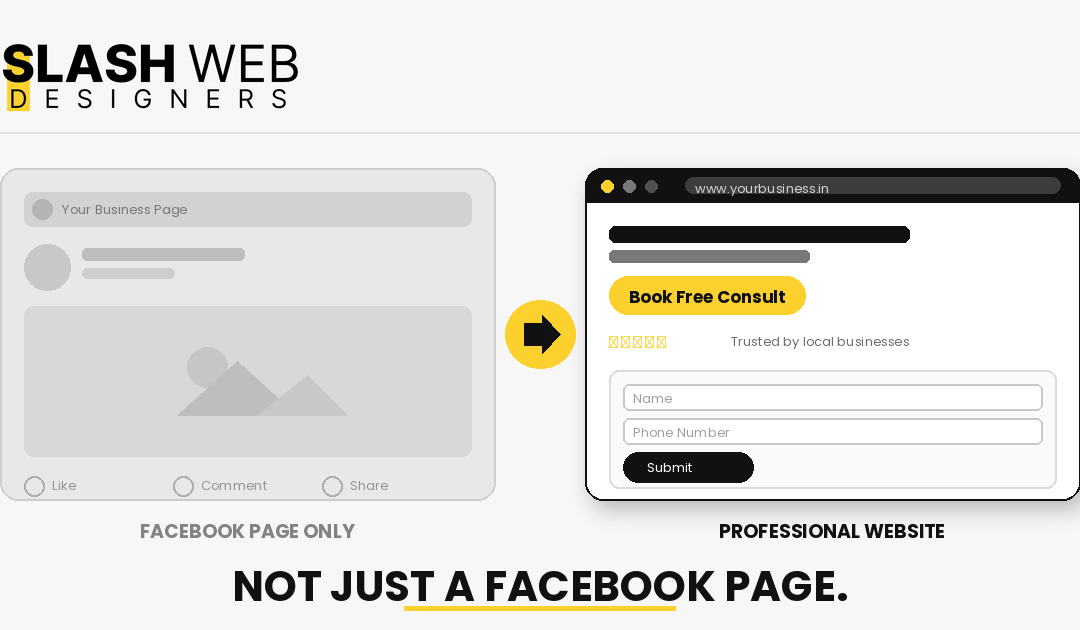
That’s not a bad starting point. A lot of businesses begin exactly there, and it costs nothing to set up. But by 2026, a Facebook page alone is starting to hold businesses back, not help them grow.
If someone searches “gym near me” or “best salon in Gachibowli” on Google, a Facebook page rarely shows up in those results. A proper website does. That gap is where a lot of Hyderabad businesses are quietly losing customers to competitors they haven’t even noticed yet.
What a Facebook Page Can’t Do for Your Business
You Don’t Own It
Your Facebook page lives on Facebook’s terms, not yours. Pages get restricted, accounts get flagged, algorithms change overnight and cut your reach in half. None of that is in your control.
A website is different. You own the domain, you own the content, and no platform update can suddenly hide it from your customers.
It Doesn’t Show Up on Google Like a Website Does
Most people don’t open Facebook to research a business anymore. They open Google. Local search behavior data from SOCi’s Consumer Behavior Index shows that most consumers now search online for local businesses on a weekly basis, and a large share do this daily.
A Facebook page can appear in search results occasionally, but it wasn’t built to rank. A website — with the right pages, headings, and local SEO — is.
It Doesn’t Build Real Trust
A Facebook page shows your posts and reviews. It doesn’t show your services clearly, your pricing structure, your team, or why a customer should pick you over the next business on the list.
A website gives you room to actually explain your business — properly, on your own terms.
It Can’t Capture Leads Properly
On Facebook, a customer can comment, DM, or call. There’s no structured way to capture their name, number, and requirement, and no way to track where your enquiries are actually coming from.
A website with a proper form does this automatically, every single time — even at 11 PM when you’re not online to reply to a DM.
Why 2026 Is the Tipping Point for Hyderabad Businesses
Two things are happening at the same time in Hyderabad right now.
First, more of your competitors are finally getting proper websites built — clinics, real estate agents, coaching centres, and local service businesses that were “Facebook-only” for years are moving online properly. Once a few businesses in a category do this well, the ones without a website start to look outdated by comparison.
Second, customer behaviour has shifted for good. Industry-wide local search data shows that a large share of consumers now visit a business’s website after reading positive reviews about it — meaning even businesses that get found through reviews or word of mouth are losing that customer at the final step if there’s no website to send them to.
2026 isn’t the year websites became necessary. It’s the year going without one started actively costing Hyderabad businesses customers.
What a Professional Website Actually Gives You
A Digital Address People Can Actually Find
Think of your website as your business’s permanent address on the internet. Customers can find your services, hours, location, and contact details in one place, any time — not scattered across a Facebook page, a Google listing, and an Instagram bio that all say slightly different things.
Local SEO Built the Right Way
This is where hiring an experienced web design company in Hyderabad actually pays off. A website built with local SEO in mind — proper location pages, service pages, and content targeting Hyderabad-specific searches — can rank for exactly the searches your customers are typing, long after the site is built.
Trust Signals That Turn Visitors Into Enquiries
A clean, professional website signals — instantly — that you run a serious business. Clear service descriptions, real photos, testimonials, and an easy-to-find contact option all quietly build the confidence a customer needs before they pick up the phone.
A Real Lead Capture System
A good website doesn’t just sit there — it works. Contact forms, WhatsApp click-to-chat buttons, click-to-call numbers, and enquiry tracking mean every visitor has an easy next step, and you know exactly how many leads your site is generating each month.
What to Look for in a Web Design Company in Hyderabad
If you’ve decided it’s time to move past a Facebook-only presence, here’s what actually matters when picking who builds it:
A real portfolio of Hyderabad businesses — not just template screenshots
SEO knowledge, not just design skill — a beautiful site that doesn’t rank won’t bring customers
Clear, upfront pricing — no vague “starting from” quotes with hidden costs later
Support after launch — websites need occasional updates, fixes, and improvements
A process that starts with your business goals, not with colour choices
Anyone can build a website. Fewer can build one that’s actually built to bring in enquiries. see our recent website projects
A Quick Example: Before and After
Picture a small fitness studio in Kondapur. For two years, it ran entirely on Instagram and a Facebook page — decent following, but most enquiries came from friends tagging friends, and growth had flattened.
Once it got a proper website — with a clear pricing page, a trial-class booking form, and content targeting searches like “gym in Kondapur” — new enquiries started coming in from people who’d never heard of the studio before. Not because the studio suddenly became more popular on Instagram, but because it became findable to people who were actively searching, at the exact moment they were deciding.
That’s the real difference a website makes. It doesn’t replace your social media — it catches the customers your social media never could.
How Slash Web Designers Approaches This
We’re not interested in handing you a generic template and calling it done. Every website we build starts with the same questions: who are your customers, what do they need to see to trust you, and what should happen after they land on your site.
From there, we build a site with local SEO in mind from day one — not bolted on afterward — so it has a real shot at ranking for the searches that matter to your business in Hyderabad.
Not sure if you’re ready for a full website yet? Talk to us for a free 15-minute consultation — we’ll give you an honest read on where your business stands, even if the honest answer is “your Facebook page is fine for now.”
FAQs
Do I really need a website if I already have a Facebook page?
If you’re relying on word of mouth and social media alone, you’re likely missing customers who search on Google before they decide. A website captures that group — the ones actively looking, not just scrolling.
How much does it cost to build a professional website in Hyderabad?
Costs vary depending on the number of pages, features (booking forms, e-commerce, etc.), and whether SEO is included. It’s best to get a clear, itemised quote rather than going by a vague “starting from” price.
How long does it take to build a business website?
A straightforward business website typically takes a few weeks from planning to launch, depending on how quickly content and approvals come through on your side.
Will a website actually bring me more customers than Instagram or Facebook?
It works alongside them, not instead of them. Social media builds familiarity; a website captures the customers who are actively searching and ready to enquire.
What’s the difference between a website and a Google Business Profile?
A Google Business Profile is a free local listing — useful, but limited to what Google allows you to show. A website is fully yours: you control the content, the design, and how customers experience your business.
Conclusion
A Facebook page got your business online. It was never going to be the thing that helped you compete in 2026 and beyond. If you’re serious about being found on Google, building real trust, and turning visitors into enquiries, a proper website — built by a web design company in Hyderabad that understands local SEO — is the next step. Talk to Slash Web Designers for a free 15-minute website consultation. We’ll tell you honestly what your business needs — nothing more, nothing less.
AI website builders are everywhere in 2026. Wix, Hostinger, Framer, Durable, and others now promise a full business website in minutes. For a busy owner, this sounds perfect — fast, cheap, and no need to hire anyone.
But a business website is not just pages on the internet. It has a job to do.
Your website needs to build trust, explain your services clearly, work well on mobile, rank on Google, collect enquiries, and make it easy for customers to contact you. A website that looks nice but does not bring leads is not doing its job.
So the real question is not “Can AI build a website?” The real question is “Can an AI website builder build the right website for your business goals?”
This blog will help you decide.
Table of Contents
What Is an AI Website Builder?
An AI website builder is a tool that uses artificial intelligence to create a website from a short prompt. You type in your business name, industry, services, and style. The tool then generates a layout, sections, copy, images, and basic SEO settings.
Wix says its AI website builder can turn a prompt into a business-ready site and still allow manual editing. Hostinger also markets its AI website builder as a way to launch a site in minutes.
An AI builder can usually handle:
Page layout
Basic website copy
Ready-made sections
Mobile responsive templates
Contact forms
Image suggestions
Basic meta titles and descriptions
Drag-and-drop editing
For a simple online presence, this is often enough. For a serious business website, it usually isn’t.
What Does a Professional Web Designer Do?
A professional web designer doesn’t start with layouts. They start with your business.
Before touching a design, a good web designer will study your services, your customers, your competitors, your pricing model, and your goals. Only then do they plan the site.
That planning covers:
Which pages your business actually needs
How the homepage should be structured
Where CTA buttons should appear
How users should move from one page to another
How forms should collect the right enquiries
How the site should support SEO from day one
How the design should build trust
How the site should behave on mobile
How leads should be tracked after launch
This is the real difference.
AI focuses on fast creation. A web designer focuses on business results.
AI Website Builder vs Web Designer: Quick Comparison
Factor
AI Website Builder
Professional Web Designer
Speed
Very fast
Takes more time
Cost
Lower upfront
Higher investment
Strategy
Basic or automated
Business-specific
Branding
Can look generic
Custom and unique
SEO
Basic features
Planned structure
Navigation
Auto-generated
Planned around buyer journey
Forms & Leads
Basic contact forms
Proper lead flow + tracking
Content
AI-generated
Human-edited, customer-focused
Scalability
Limited by platform
Easier to grow
Support
Platform-based tickets
Direct human expert
Best for
Simple websites
Growth-focused business websites
Benefits of AI Website Builders
Fast to Launch
The biggest benefit is speed. You can go from prompt to published in a day. This is useful when you need:
A temporary landing page
A simple personal website
A small portfolio
A basic startup site
A quick test for a new business idea
If your goal is only to get something online quickly, AI is a fine choice.
Lower Upfront Cost
AI builders cost less than hiring a designer. For a new business with a tight budget, this feels helpful.
But cost is not the only measure. A cheap website becomes expensive if it doesn’t bring enquiries, doesn’t rank, and has to be rebuilt in a year.
Easy for Non-Technical Users
Most AI builders are made for people with zero coding knowledge. You can edit text, swap images, move sections, and publish — all through simple controls.
Good for First Drafts
AI is genuinely useful for ideas. It can suggest sections, headings, copy angles, and design direction. Even professional web designers use AI as a support tool.
The problem starts when a business relies on AI alone, with no human planning behind it.
Limitations of AI Website Builders
Shallow Business Understanding
AI can build a general website, but it cannot deeply understand your business.
It usually doesn’t know:
What your customers really care about
Why people choose your service over competitors
What doubts customers have before enquiring
Which services are actually profitable for you
How your local competitors position themselves
What trust signals your website needs
A generic site is fine for a hobby. It’s a problem for a business that lives on leads.
Generic-Looking Websites
AI outputs often look clean — and identical. Same hero section, same three service cards, same testimonial strip, same contact block.
That’s not “wrong.” But if your website looks like every other business in your industry, customers won’t remember you.
An AI builder can create a contact form. But your business doesn’t need “just a form.” It needs a lead system.
A designer will think about:
Where the form appears on every page
Whether service pages need their own forms
How many fields to include
Whether users prefer call, WhatsApp, email, or booking
Whether the form connects to a CRM or email tool
Whether spam protection is added
Whether conversion tracking is set up
What happens after submission
For ecommerce, the stakes are even higher. Baymard Institute reports an average online shopping cart abandonment rate of 70.22% across 50 studies, and large ecommerce sites can lift conversions by 35.26% through better checkout design.
Forms and checkout flows directly affect revenue. AI-generated defaults rarely get this right.
Navigation That Doesn’t Match Buyer Journey
AI creates a menu automatically. But a clinic, a restaurant, a real estate firm, a school, and an IT services company should not all have the same menu.
Customers need to find:
Services
Pricing or packages
Location
Reviews
FAQs
Contact / booking
If your navigation is confusing, users leave. A designer plans the menu around how your customers actually make decisions.
Surface-Level SEO
Many AI builders include SEO fields. That’s not the same as SEO strategy.
Real SEO needs:
Keyword research
Search intent planning
Proper service page structure
Local SEO (especially for Hyderabad businesses)
Internal linking
Optimized headings
Fast page speed
Image optimization
Schema markup
Helpful, human-written content
A blog strategy
Google advises creating helpful, reliable, people-first content. Generic AI-written copy rarely meets that bar without expert editing.
A website has to load fast and behave well on phones.
Google’s Core Web Vitals measure loading performance, interactivity, and visual stability, and Google uses mobile-first indexing, meaning the mobile version of your site is what Google primarily crawls and ranks.
AI sites often look fine on desktop but break on mobile — buttons too small, forms cut off, spacing off, images too heavy. A designer tests all of this before launch.
Support Gaps After Launch
When forms stop working, tracking breaks, or rankings drop, you need someone who understands your business — not a chatbot from a platform.
A designer or small agency can help with:
Updates
Bug fixes
Speed improvements
New pages
SEO changes
Form testing
Tracking setup
Redesigns and maintenance
A business website is not a one-time project. It’s a long-term asset.
Related read: [Freelancer vs Web Design Agency: What’s Better for Your Business?]
Benefits of Hiring a Professional Web Designer
Strategy First, Design Second
A good web designer doesn’t start with colours. They start with questions.
Who is your target customer?
What services matter most?
What action should visitors take?
What pages are needed?
What objections do customers have?
What makes your business trustworthy?
The design flows from those answers.
Stronger Brand Trust
Your website creates the first impression of your business.
Stanford’s web credibility guidelines — based on research with more than 4,500 people — recommend that websites show a real organization, make contact easy to find, look professional, be easy to use, and avoid small errors.
Small design details compound into trust — or the lack of it. Customers do notice.
Better User Experience
UX is how easily people can use your site. A professional website should help visitors:
Understand what you offer within 5 seconds
Find the right service
Trust your business
Contact you without friction
Take the next step without thinking
That takes real planning.
SEO Built Into the Foundation
A designer builds the site with SEO baked in from day one:
Clean page hierarchy
Dedicated service pages
Clean URLs
Optimized headings
Strong internal links
Fast loading
Mobile-friendly layout
Schema markup
Blog structure
Local SEO signals
Adding SEO after launch is always harder — and usually more expensive.
Real Lead Generation Setup
A designer plans your website as a lead machine, not just an online brochure:
Clear CTA buttons
WhatsApp and call buttons on mobile
Service-specific enquiry forms
Trust sections
Testimonials and case studies
FAQs
Thank-you pages
Conversion tracking
A website doesn’t generate leads just by being online. It generates leads when it makes the next step easy.
When to Use an AI Website Builder
An AI website builder is a good fit if:
You need a basic site quickly
Your budget is very tight
You are testing a business idea
Your business doesn’t depend on website leads
You don’t need advanced SEO
You can handle updates yourself
You only need a simple online presence
There’s no shame in using AI for this. It’s the right tool for the right job.
When to Hire a Professional Web Designer
Hire a designer if:
Your website is a real source of leads or sales
You want a strong, professional brand image
You need SEO from the beginning
You need proper enquiry forms and lead capture
You need WhatsApp, call, CRM, or tracking integration
You want custom service pages
You want navigation planned around your customers
You need long-term support
You want the website to grow with your business
For most serious businesses, a designer gives better long-term value.
The Right Approach for Businesses in 2026
Here’s the honest take, no marketing spin:
Use AI as a support tool. Don’t rely on AI alone for a business website that has to generate leads, build trust, and grow with you.
The best websites in 2026 will use AI to speed up ideas, first drafts, and layouts. But strategy, planning, testing, and long-term improvement still need a human expert behind them.
Why Hyderabad Businesses Need to Choose Carefully
Hyderabad has serious competition in almost every industry — healthcare clinics in Jubilee Hills, restaurants in Gachibowli, real estate firms in Kondapur, coaching centres in Ameerpet, IT services companies in HITEC City, manufacturers on the outskirts.
Your customers compare businesses online before they call, walk in, or book. If your website looks generic, loads slowly, has weak content, or makes it hard to reach you, you will lose leads to competitors who invested more thought into theirs.
A professional website helps Hyderabad businesses improve:
Local SEO (“near me” and neighbourhood searches)
Brand trust
Service enquiries
Mobile experience
WhatsApp leads
Google visibility
Long-term growth
Final Verdict
AI website builders are useful for quick, simple websites. They save time and reduce upfront cost.
But if your website matters for growth, SEO, branding, customer trust, and lead generation, a professional web designer is the better choice.
A business website should not just be created fast. It should be planned properly, tested carefully, and improved over time.
At Slash Web Designers, we build professional, SEO-friendly, mobile-responsive websites for Hyderabad businesses — designed for trust, enquiries, and long-term growth.
Not sure whether an AI builder is enough, or whether your business needs a designer? [Talk to us for a free consultation] — we’ll give you an honest answer based on your goals, even if the answer is “AI is fine for now.”
FAQs
Is an AI website builder good for a business?
Yes, for a simple business website with basic requirements. But if your business needs strong SEO, unique branding, custom lead capture, and long-term support, an AI builder alone usually isn’t enough.
Can AI replace a web designer in 2026?
Not fully. AI can speed up website creation, but it cannot replace human strategy, business understanding, UX planning, or expert customization. Most serious sites still need a human behind them.
Is an AI-generated website SEO-friendly?
It can cover basics like meta titles and descriptions. But real SEO — keyword research, page structure, local SEO, internal links, speed, and helpful content — needs human planning.
Which is cheaper: AI website builder or web designer?
AI builders are cheaper upfront. A web designer costs more because the site is planned, customized, and optimized for your specific business goals. Long term, a well-designed site often pays for itself in leads.
Which is better for lead generation?
A professional web designer, in most cases. Designers plan CTAs, forms, trust sections, navigation, and tracking — the parts that actually convert visitors into enquiries.
Should small businesses in Hyderabad use AI website builders?
Small businesses can use AI for a quick start. But if your website is meant to generate consistent leads, build local trust, and rank on Google, working with a Hyderabad-based web designer is usually the better investment.